Buffering during your favourite show or a live match is almost always blamed on the streaming service itself — but in a huge number of cases, the real bottleneck is sitting much closer to home: your broadband speed. Getting this right matters more for IPTV than for most other types of streaming, since IPTV shares your existing internet connection with everything else in your household. This guide breaks down exactly what speed you need for smooth 4K IPTV streaming in the UK, how that changes with household size, and how to make sure your connection is actually delivering what you’re paying for.
The Baseline Numbers
Different resolutions demand different amounts of bandwidth, and getting a rough sense of these numbers makes everything else in this guide easier to plan around.
Standard Definition (SD) streaming needs relatively little — generally around 3–5 Mbps is enough for smooth playback without buffering.
High Definition (HD, 1080p) streaming typically needs 5–10 Mbps per device for consistently smooth quality.
4K Ultra HD streaming is a significant step up, generally requiring at least 25 Mbps per device for reliable playback, with most providers recommending a bit of headroom above that minimum for consistency during peak usage.
These figures are per stream, per device — which is the detail that catches most households out. A single person watching one 4K stream on one TV has very different requirements from a household running two 4K streams alongside a couple of HD devices and general browsing at the same time.
Why Headroom Matters More Than the Bare Minimum
Providers often quote a bare minimum speed requirement, but treating that minimum as your actual target is a common mistake. Real-world broadband performance during peak hours typically runs somewhere between 60% and 90% of your advertised maximum speed, and Wi-Fi itself can reduce your effective speed by a further 20–50% depending on distance from your router and interference from walls or other devices.
This means a connection advertised at exactly 25 Mbps might realistically deliver considerably less than that to your streaming device during a busy evening, particularly over Wi-Fi rather than a wired connection. Building in meaningful headroom above the bare technical minimum is what actually prevents buffering in practice, rather than just on paper.
How Much Speed Your Household Actually Needs

Rather than working from a single number, it’s more useful to think in terms of household size and streaming habits.
Single person or couple, occasional 4K viewing: A connection in the 30–60 Mbps range comfortably supports one 4K stream with reasonable headroom for general browsing and the odd second device.
Family of three to four, mixed HD and 4K viewing: Aim for somewhere in the 60–150 Mbps range, which comfortably supports several simultaneous HD streams and occasional overlapping 4K viewing without one device starving another of bandwidth.
Larger households or smart-home-heavy setups, multiple simultaneous 4K streams: Look toward 150–500 Mbps, particularly if multiple 4K streams might run at once alongside gaming, video calls, and a growing number of connected smart devices.
Gigabit-capable connections (1,000 Mbps and above): These comfortably cover essentially any plausible household streaming scenario, and are increasingly available across a large majority of UK premises as full-fibre rollout continues.
As a general rule of thumb, a good working calculation is to add up the requirements of everything likely to be running simultaneously during your busiest realistic evening, then build in roughly 30–40% extra headroom on top of that total.
Fibre vs Standard Broadband for IPTV
Connection type matters almost as much as the headline speed number. Full fibre connections deliver consistently stable speeds much closer to their advertised maximum, which matters enormously for live sport specifically, where a sudden dip in speed shows up immediately as buffering during exactly the moment you don’t want it.
Older FTTC (fibre-to-the-cabinet) connections, which still make up a meaningful share of UK broadband, can typically handle around two 4K streams comfortably but may start to struggle with three or more running simultaneously, particularly during peak evening hours when overall network congestion in your area tends to be at its highest. If your household frequently pushes multiple 4K streams at once and you’re still on an older FTTC connection, an upgrade to full fibre is one of the most effective single changes you can make for IPTV reliability.
Wired vs Wireless: Why It Matters So Much for Live Sport
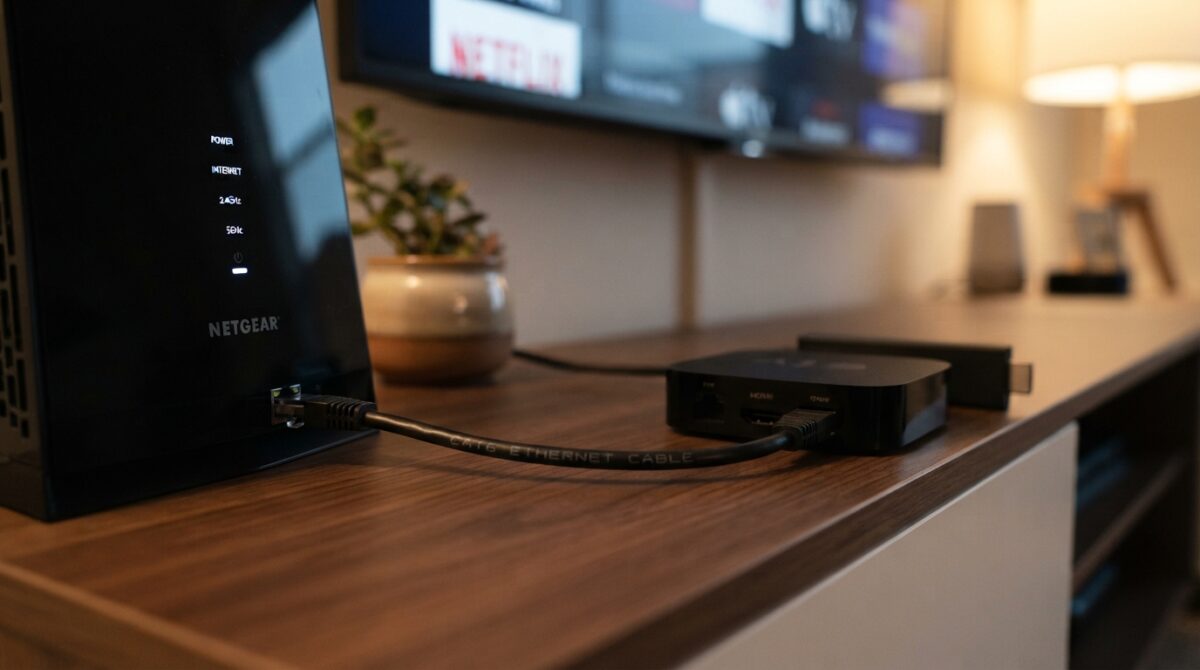
For any household serious about reliable IPTV, particularly for live sport, a wired ethernet connection between your router and your primary streaming device removes one of the biggest sources of variability entirely. Wi-Fi is shared bandwidth, subject to interference from walls, other electronics, and distance from your router — all of which can fluctuate throughout an evening in ways that are hard to predict or diagnose. Ethernet gives your streaming device a dedicated, stable connection that isn’t competing with anything else in the same way.
If running a cable to your main TV isn’t practical, a powerline adapter (which sends data over your home’s existing electrical wiring) is a reasonable middle-ground option that generally offers more consistency than Wi-Fi alone, particularly in properties with thick walls or older wiring that weakens wireless signal.
Testing Your Real-World Speed
A speed test run once, in the morning, when nobody else is home, tells you very little about what your connection actually delivers during a Saturday evening when everyone’s devices are active at once. For an accurate picture:
- Test during your actual peak usage window — typically evenings, and especially during a live match if that’s when you experience issues.
- Test on the specific device you stream on, not just your phone, since older streaming hardware itself can be a separate bottleneck entirely.
- Test with other household devices active, since a speed test run in isolation doesn’t reflect real-world contention for bandwidth.
- Compare wired versus Wi-Fi results on the same device, which often reveals a meaningful gap that explains inconsistent streaming quality.
Common Speed-Related Mistakes
Assuming a high advertised speed guarantees smooth 4K streaming. Advertised maximum speeds and real-world delivered speeds, particularly over Wi-Fi during peak hours, are often meaningfully different.
Not accounting for other devices on the network. Smart home devices, other people’s phones and laptops, and background downloads all compete for the same bandwidth pool, even when nobody’s actively “using” them for anything demanding.
Placing the router in a poor location. Router placement has a bigger effect on Wi-Fi performance than most people expect — a router tucked in a cupboard or at the far end of the house from your TV can meaningfully undercut your effective speed regardless of your actual broadband plan.
Overlooking router age. An outdated router, particularly anything predating Wi-Fi 5 or 6 standards, can become a genuine bottleneck on its own, even with excellent broadband speeds coming into the property.
Putting It All Together for IPTV Specifically
IPTV has one characteristic that makes broadband speed matter slightly more than it does for something like Netflix: because IPTV delivers live, continuous content rather than content you can pre-buffer well in advance, any dip in your connection shows up immediately as visible buffering rather than being smoothed over by a large local buffer built up beforehand. This is particularly noticeable during live sport, where matchday demand across your household — and across your wider neighbourhood’s shared local infrastructure — tends to peak at exactly the same time.
Choosing a properly licensed IPTV subscription removes one major variable (blocking-related interruptions tied to unlicensed content sources), but a genuinely stable, adequately fast home connection is what handles the rest — and it’s worth getting both pieces right rather than assuming either one alone solves the whole picture.
Frequently Asked Questions
What’s the minimum speed for 4K IPTV streaming? Generally around 25 Mbps per device is the widely recommended minimum, though building in extra headroom above that gives more consistent results in practice.
Is 100 Mbps broadband enough for a family streaming IPTV? For most households of three to four people with mixed HD and occasional 4K viewing, 100 Mbps comfortably handles simultaneous streaming with reasonable headroom.
Does Wi-Fi affect 4K streaming quality even with fast broadband? Yes — Wi-Fi can reduce your effective speed significantly compared to a wired connection, particularly depending on distance from the router and interference from walls or other devices.
Should I upgrade from FTTC to full fibre for IPTV? If your household regularly streams multiple simultaneous 4K devices, or you experience frequent buffering during peak hours, a full fibre upgrade is generally one of the more effective fixes available.
How much data does 4K IPTV streaming use? 4K streaming typically uses roughly 7 GB per hour, compared to around 3 GB for HD and closer to 1 GB for SD content — worth factoring in if your broadband plan has any data considerations.
Final Thoughts
Getting smooth 4K IPTV streaming in the UK comes down to matching your broadband speed and connection type to your household’s actual usage pattern, rather than chasing the single highest number available. A wired connection, realistic headroom above the bare minimum requirement, and an honest assessment of how many devices are actually competing for bandwidth at once solve the vast majority of speed-related buffering — leaving content licensing and provider reliability as the remaining, separate half of the equation.
This article is for informational purposes only. Broadband speeds, pricing, and provider offerings change frequently — always check current availability and pricing directly with providers before switching or upgrading.